Agenda
| Before 7pm | Log in Routine |
| 7:00 - 7:15 | Cohort Exercise |
| 7:15 - 7:45 | HTML Elements |
| 7:45 - 8:00 | Boilerplate HTML |
| 8:00 - 8:45 | Demo: recipe.html |
| 8:45 - 9:00 | Exercise: Make your own how-to tutorial |
Log in Routine
Here are a few things you'll do at the beginning of every class:
- Log into the the student account on the lab computer.
- Even if you're using your own device, the classroom wifi seems a bit weak, and the desktop computers are hard-wired with ethernet cables, which makes the connection more reliable.
- Sign into the Contra Costa Codes Slack team with your email and password on the lab computer.
- The classroom wifi isn't quite strong enough to fully load Slack on your device unless your using a personal hotspot.
- Keep Slack open in a tab or in another window (which can be minimized) so that you can open it quickly to post a question or find a link that has been shared.
- If you brought you're own device, connect it to the class wifi, which seems to be strong enough to run Glitch.
- Log into Glitch and pull up the exercise from last class.
Remember to log out Slack and Glitch at the end of class!
Cohort Exercise
Let's complete the exercise from last week.
- Log into Glitch.
- Add a name to your profile.
- Click your profile icon near the top right corner of the page.
- Click on the name "Anonymous," and that will bring up your profile.
- In the first textbox, type your name or psuedonym.
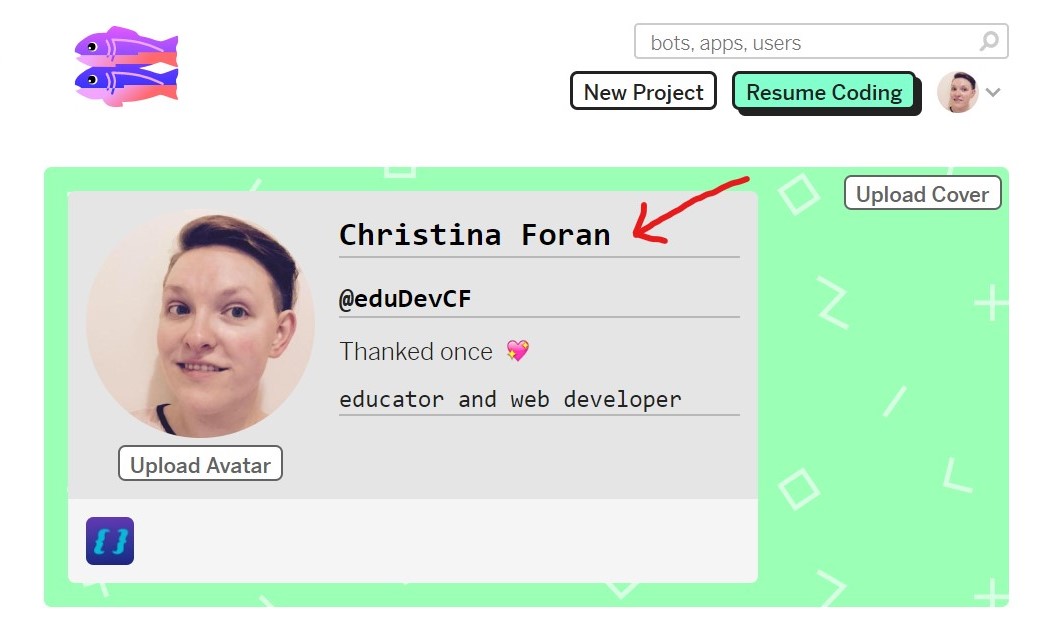
- Now I will know who is making changes on our project. I'll be removing all anonymous users from the project.
- Click this link to edit the contracostacodes project, and you'll automatically be granted permissions to edit the project.
- Select the html-css-cohort.html page from the file list on the left.
- Clicking on the 🕶️ Show dropdown to display a preview. You can choose to show the page right beside the code (which is helpful, but makes the code window smaller) or in a new window (which opens a new tab that you'll need to switch between to see the changes).
- Scroll through the code to find a <!-- Card Section --> that hasn't been filled in yet and add the following information:
- Your name
- Your github/glitch username
- A short description of the website you want to make for your final project
Futher study
If you finish early, check out the HTML first few tutorials from w3schools.com.
HTML Elements
Anatomy of an HTML Tag
HTML elements are wrapped in opening and closing tags.
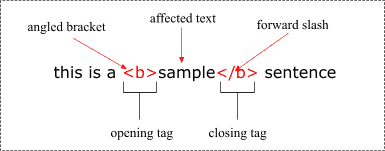
A few elements don't need closing tags. They are called self-closing tags or void tags.
<br> <hr> <img> <input> <link> <meta>
Opening tags can also include attributes with information specific to that kind of element.
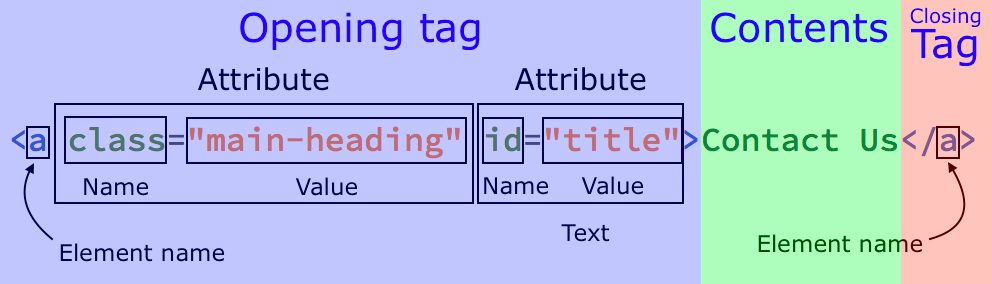
Make sure you close tags in the order you open them!
Types of HTML Elements
HTML Element Reference by CategorySemantic HTML
HTML5 emphasizes using elements that convey meaning or for specific purposes rather than how the content should look.
Examples:
- <b> makes the text bold, but has no built-in meaning.
- <strong> makes the text bold, and carries the meaning that this text is important.
- <i> makes the text italic, but has no built-in meaning.
- <em> makes the text italic, and carries the meaning that this text is emphasized.
- <cite> also makes the text italic, but should only be used for the title of a work (book, song, painting, movie, etc.).
- <div> is a generic container used in layouts.
- <main> works like a div but tells the browser this is the main section of the page.
Semantic HTML is good for accessibility and Search Engine Optimization (SEO).
Bottom line: 99% of the time, you should use CSS to change how elements look.
Boilerplate HTML
What every HTML document needs
SitePoint Tutorial: A Basic HTML5 Template For Any Project
You can find a start template in our contracostacodes Glitch project named boilerplate.html.
Demo: recipe.html
- Starter HTML
- Without Markup
- Headings
- Paragraph
- List
- Links
- Images
Exercise: Make your own how-to tutorial
Pick a skill, recipe, craft, or project you're interested and write a how-to tutorial.
- Start by writing out the steps in a document without HTML. For this project, it's OK to start with a tutorial you found online.
- Create a new Glitch project with the name format: username-howto.
- Share the link to your project in the #javascript Slack channel.
- Feel free to copy the code from recipe.html to get started. Or if you're feeling confident, markup your tutorial from scratch!
- Try to find an hour this week to work on the project at home, or come in 30 minutes early before next week's class.
- There will be time at the beginning of class to answer questions and review each others code.
- We'll use this tutorial to practice the CSS skills we learn next week!